 Icom_OKA®
by WB7OK
Radio Amateurs: Control your ICOM Transceiver With Your Computer.
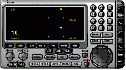
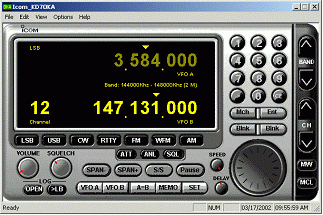
Icom_OKA is a Windows 95/98/2000/XP program that interfaces with the ICOM CT-V (CT-17 serial) interface. Originally designed for the ICOM 706MkII transceiver, the program works for most ICOM transceivers and receivers with a serial interface.
FEATURES
- Clean, easy to use graphical interface
- Easy jump to or move the frequency least 9 different ways. See the rest of the manual for explanation
- Slow to fast frequency movements
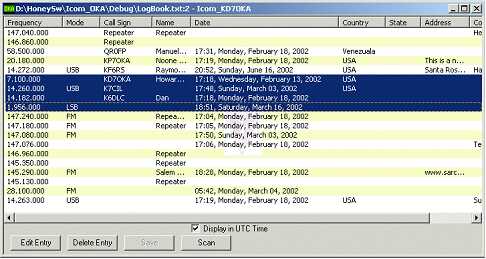
- Logbook features automatically records frequency, date and time
- Logbook allows entry of call sign, name, address, country and comments
- Switch VFO's A or B and Channels
- Switch to any channel programmed in the transceiver
- Write/Erase channels on the transceiver
- Easily program scanning frequencies, then start and pause scanning
- Easily jump to modes.
- Enable disable filters and DSP functions
- Scan your favorite frequencies in your logbook
Logbook
The logbook function is designed to give you all the functions of an computer based logbook plus interface to the transceiver controls.
System Requirements
- Windows 95/98/2000/XP
- 486-33Mhz or faster
- Icom transceiver or receiver with a CT-17 interface.
Price
This version allows you to try Icom_OKA absolutely free for non-commercial use. You can't charge for the use or your services while using this program. But that is against the FCC rules of Amateur Radio, anyway. All you need to do is download a copy.
Download Icom_OKA manual
View the manual. The manual is in Window MS Word format. Coming soon:
Adobe format. The manual is also included in the setup program so no need to
download it if you are going to install the program.
- Click on the site below.
- Download the manual, saving in a folder of your choice. (File size is about 1.9MB).
- Unzip it using Winzip or your favorite unzipper.
- Run word and open the manual (icom_oka.doc).
Download Icom_OKA
Version 1.0 can be downloaded from this website. The manual is included in the setup program.
- Click on the site below.
- Download the file, saving in a folder of your choice. (File size is about 1.9MB).
- Run the setup program (setup_oka.exe).
- Follow the instructions in the setup.